XML Schema Definition (XSD)
The schema directory contains XML Schema Definition (XSD) files that formally define the structure, content, and validation rules for metadata records. These files specify the elements, attributes, data types, and constraints that metadata documents must conform to.
Overview
Purpose
- Define the formal structure of metadata records
- Specify allowed elements and their relationships
- Define data types and value constraints
- Enable automated validation of metadata documents
- Support metadata editor form generation
- Facilitate schema composition and inheritance
XML Schema Definition
XSD is a W3C standard (XML Schema Part 1: Structures) that provides a comprehensive language for describing the structure of XML documents. XSD files serve as the blueprint for valid metadata records.
Schema Organization
Directory Structure
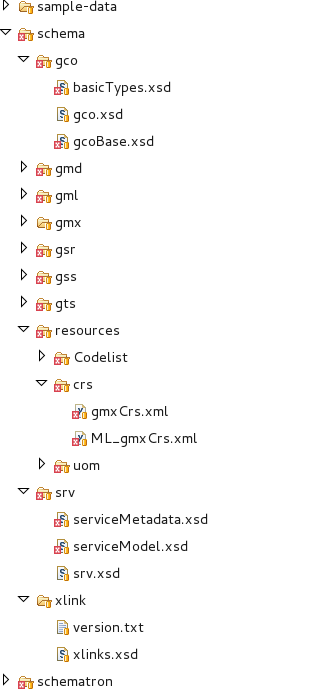
The schema directory typically contains:
schema.xsd: Main entry point that includes and imports all other schema files- Namespace-specific subdirectories: Organized by namespace URI
gmd/: ISO19115/19139 geographic metadata namespacegco/: ISO19115/19139 general common object typesgml/: Geography Markup Language namespacesrv/: ISO19119 service metadata namespacegmx/: ISO codelist and extensions namespace- Custom namespace directories for profile-specific elements
Example Structure
schema/
├── schema.xsd (main entry point)
├── gmd/
│   ├── gmd.xsd
│   ├── identification.xsd
│   ├── spatialRepresentation.xsd
│   └── ...
├── gco/
│   └── gco.xsd
├── gml/
│   └── gml.xsd
├── srv/
│   └── srv.xsd
└── extensions/
    └── mcpExtensions.xsd (profile-specific)
Main Schema File (schema.xsd)
Purpose
The schema.xsd file serves as the main entry point for GeoNetwork and other tools. It includes and imports all necessary schema components.
Structure
<?xml version="1.0" encoding="UTF-8"?>
<xs:schema targetNamespace="http://bluenet3.antcrc.utas.edu.au/mcp"
           elementFormDefault="qualified"
           xmlns:xs="http://www.w3.org/2001/XMLSchema"
           xmlns:mcp="http://bluenet3.antcrc.utas.edu.au/mcp"
           xmlns:gmd="http://www.isotc211.org/2005/gmd"
           xmlns:gmx="http://www.isotc211.org/2005/gmx"
           xmlns:srv="http://www.isotc211.org/2005/srv">

  <!-- Include local extensions -->
  <xs:include schemaLocation="schema/extensions/mcpExtensions.xsd"/>

  <!-- Import other namespaces -->
  <xs:import namespace="http://www.isotc211.org/2005/srv"
             schemaLocation="schema/srv/srv.xsd"/>
  <xs:import namespace="http://www.isotc211.org/2005/gmx"
             schemaLocation="schema/gmx/gmx.xsd"/>
</xs:schema>
Key Elements
- targetNamespace: The primary namespace for this schema
- include: References to local schema files within the same namespace
- import: References to schema files from other namespaces
Schema Composition
Include vs. Import
- Include: Used for files in the same namespace (local extensions)
- Import: Used for files from different namespaces (base standards)
Namespace Management
Schemas use XML namespaces to:
- Avoid element name conflicts
- Support schema composition
- Enable profile-specific extensions
- Organize schema components logically
Schema Elements and Types
Complex Types
Define structure for elements with child elements or attributes:
<xs:complexType name="MD_Metadata_Type">
  <xs:complexContent>
    <xs:extension base="gmd:MD_Metadata_Type">
      <xs:sequence>
        <xs:element name="revisionDate" type="gco:Date_PropertyType" minOccurs="0"/>
      </xs:sequence>
    </xs:extension>
  </xs:complexContent>
</xs:complexType>
Simple Types
Define constraints on text values:
<xs:simpleType name="MD_TopicCategoryCode_Type">
  <xs:restriction base="xs:string">
    <xs:enumeration value="farming"/>
    <xs:enumeration value="biota"/>
    <xs:enumeration value="boundaries"/>
    <!-- More values... -->
  </xs:restriction>
</xs:simpleType>
Element Declarations
Define elements that can appear in documents:
<xs:element name="MD_Metadata" type="mcp:MD_Metadata_Type"/>
Profile Extensions
Extension Mechanism
Profiles extend base schemas by:
- Defining new types that extend base types
- Creating new elements with substitutionGroup pointing to base elements
- Adding optional elements to existing structures
Example Extension
<xs:element name="MD_Metadata" substitutionGroup="gmd:MD_Metadata"
            type="mcp:MD_Metadata_Type"/>

<xs:complexType name="MD_Metadata_Type">
  <xs:complexContent>
    <xs:extension base="gmd:MD_Metadata_Type">
      <xs:sequence>
        <xs:element name="revisionDate" type="gco:Date_PropertyType"
                   minOccurs="0"/>
      </xs:sequence>
      <xs:attribute ref="gco:isoType" use="required"
                   fixed="gmd:MD_Metadata"/>
    </xs:extension>
  </xs:complexContent>
</xs:complexType>
The gco:isoType attribute identifies the base element being extended.
Substitution Groups
Substitution groups allow elements to be used interchangeably:
<!-- Base element -->
<xs:element name="MD_Constraints" type="gmd:MD_Constraints_Type"/>

<!-- Substitutes can replace MD_Constraints -->
<xs:element name="MD_Commons" substitutionGroup="gmd:MD_Constraints"
            type="mcp:MD_CommonsConstraints_Type"/>
<xs:element name="MD_LegalConstraints" substitutionGroup="gmd:MD_Constraints"
            type="gmd:MD_LegalConstraints_Type"/>
This enables flexible schema design where profiles can introduce new element options.
Best Practices
- Clear Namespaces: Use descriptive namespace URIs that identify your schema uniquely
- Modular Design: Separate concerns into different schema files for maintainability
- Consistent Naming: Follow ISO standards naming conventions for elements and types
- Documentation: Include xs:annotation elements with xs:documentation for clarity
- Reusability: Design types and elements to be reusable across your schema
- Version Management: Track XSD versions alongside schema versions
- Testing: Validate sample metadata against the schema before deployment
- Standards Compliance: Base extensions on established standards like ISO19115/19139
ISO19115/19139 Reference
For geographic metadata, the standard namespaces include:
- gmd: Geographic Metadata (http://www.isotc211.org/2005/gmd)
- gco: Geographic Common Objects (http://www.isotc211.org/2005/gco)
- gsr: Geographic Spatial Reference (http://www.isotc211.org/2005/gsr)
- gss: Geographic Spatial Scheme (http://www.isotc211.org/2005/gss)
- gts: Geographic Temporal Schema (http://www.isotc211.org/2005/gts)
- srv: Service Metadata (http://www.isotc211.org/2005/srv)
Integration with Other Components
The XSD schema works together with:
- Codelists: Define allowed values for enumerated elements
- Schematron: Enforce complex constraints and business rules
- Labels: Provide human-readable names for elements
- Sample Data: Example metadata demonstrating schema usage